
Shopify app
In the Shopify App StoreFill in product data from images. Review it inside Shopify.
1tm AI Product Info reads product images, the Shopify data already on the product and matching web sources to draft titles, descriptions, product type, tags and structured features. You compare the suggestions with your product and apply the ones that fit.
Officially published and visible to every merchant in the Shopify App Store. Free covers 10 analyses per UTC calendar month with no base price. Standard includes 100 and charges per analysis beyond that.
 1tm AI Product Info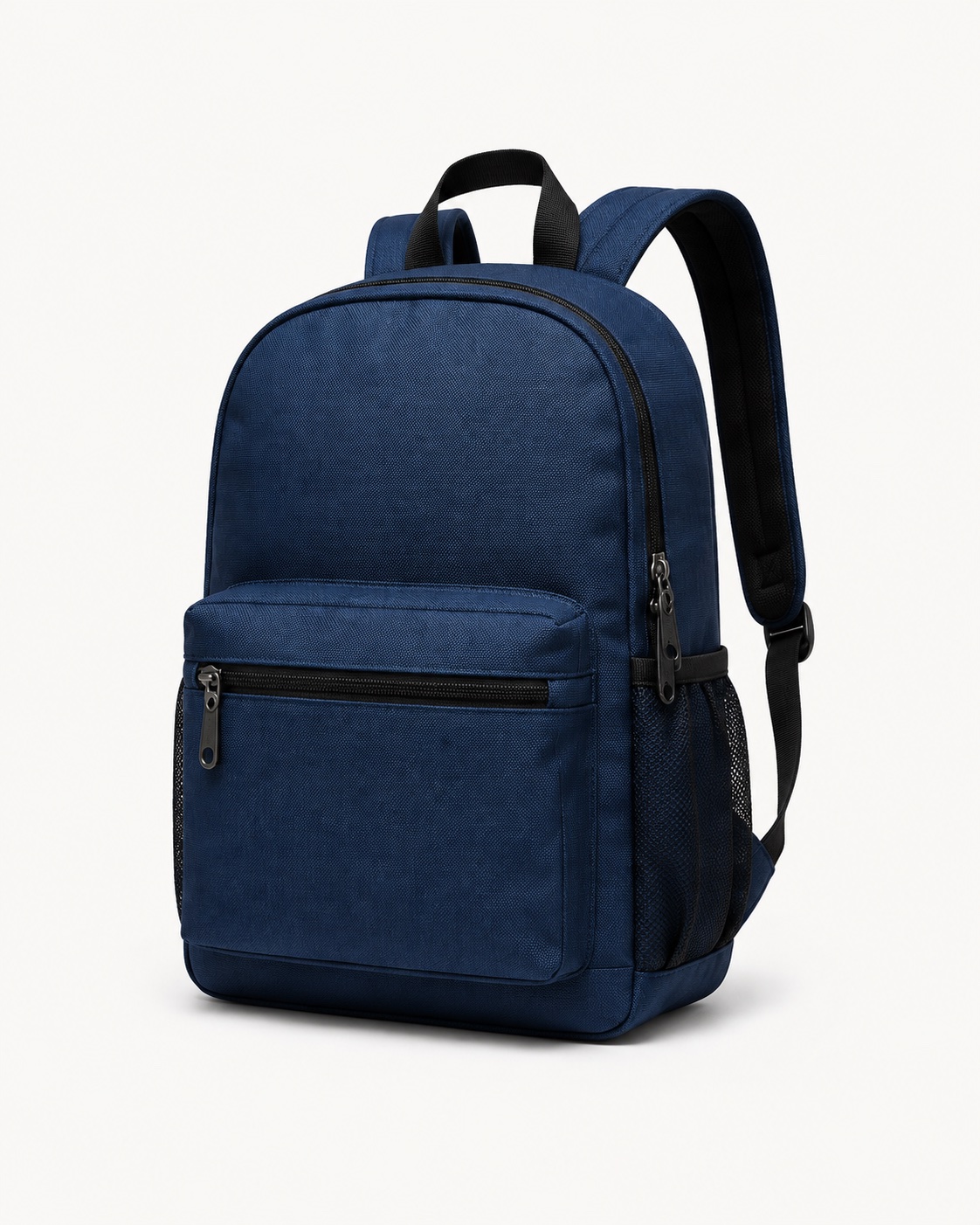
Bags & backpacks
Backpack in dark blue
- Colour
- Dark blue
- Pattern
- Plain
- Shape
- Rounded top
- Closure
- Zip
- Details
- Front pocket & side pockets
- Material look
- Textile
An illustration of possible results. The exact material composition needs evidence. Check the values before you apply them.
The app drafts product copy and stores the features you select. A feature table like the one shown needs matching theme support in your shop. Separate SEO titles and meta descriptions are left untouched. How to show features in your shop
Free
USD 0
10 completed analyses per UTC calendar month, with no additional usage charges.
Standard
USD 19 per 30 days
100 analyses per UTC calendar month included, then USD 0.10 per analysis.
Installation and plan management run through Shopify.
The next product does not have to start from nothing.
The product exists. Its description is two lines from a supplier, the material is recorded somewhere else, and for the next market there is no copy at all. That is where the app starts: it turns what you already have into a suggestion you can check.
It reads the Shopify category, product options and variants along the way. A technical spare part needs different information from a PDF or a piece of clothing. Properties that are unknown or contradictory can stay empty. Your existing content is protected by default when you apply.
How it works
From the product you have to a suggestion you checked
- 01
Pick a product
One product from its detail page through “Enhance with AI”, or up to 50 at once from the product list.
- 02
The AI analyses
Google Gemini reads the images and the existing data. Web sources can add to that where they match the product. Quality depends on the evidence available.
- 03
Review the suggestions
Per field you see the old value next to the proposed one, along with whatever sources and confidence scores exist. A missing score is shown as missing. You choose what gets applied.
- 04
Apply
You apply the selected fields per product. Features are stored in a structured form on the product. On products that are already published, applied copy can appear in the shop immediately.
Auto-apply is off until you switch it on. Once on, your confidence threshold governs, 85 % by default, including for batch analyses. A suggestion with no confidence stays for manual review. The value is the model's estimate, not a measured hit rate.
Where the app takes work off your hands
The starting point is the product you already have. No export, and no AI account of your own.
Prepare new products
Supplier information and images become drafts for titles and descriptions. You check them right next to the existing product.
Fill gaps in the catalogue
Select up to 50 products for a batch analysis, then review and apply per product. Existing content is kept unless you explicitly allow overwriting.
Write descriptions for more markets
Have descriptions prepared in the published shop languages you select. Seven output languages and four writing styles are available.
Store features so they can be reused
Materials, dimensions and other evidenced properties stay on the product in structured form. Your agency can wire that data into a feature table in the theme.
What does your assortment need stated?
Product images are one way in. Existing copy, the Shopify category and the variants give further context. Open the example closest to your product type.
The examples show possible uses. They are not a promise that every property will be recognised. Features that are unknown, contradictory or out of place can stay empty.
Fashion and accessories
Work up material composition, care and the properties shared across the product. Sizes and colours stay with their variants; a single variant should not end up describing the whole item.
Technical goods and spare parts
Describe documented dimensions, units and model information in plain terms. Compatibility and performance figures need matching evidence. Prices and variant SKUs are not changed.
Food and consumables
Carry existing ingredients, allergens or contents into the copy. The app should not infer any of that from appearance. Net quantity and shipping weight stay separate figures.
Handmade and one-off pieces
Explain your own materials, how something was made and what is particular about it. Items without a GTIN work too. A test that was never run must not turn into a confirmed suitability.
Digital products
Describe file format, scope and evidenced usage requirements, with no product photo needed. Physical properties can be left out. Download delivery and licence management stay with the tools you already use.
Home, furniture and decoration
Bring together evidenced dimensions, materials and care information. Visible features from photos help with the description; load ratings or certifications need additional stated information.
What lands where in Shopify?
| Result | Effect in your shop |
|---|---|
| Title, description, vendor, product type, tags | Native product fields. Applied copy can be visible immediately on published products. |
| Further description languages | Shopify translations for the matching published languages. |
| Selected features | Metaobjects linked to the product. A visible feature table and filters need additional setup. |
| Available sources, confidence and GTIN suggestion | Accompanying metadata. A GTIN suggestion changes no variant barcode. |
Shopify taxonomy categories, prices, inventory, variant SKUs, images and the separate SEO fields are not written. The app publishes no draft products.
Start with one product.
Install 1tm AI Product Info from the Shopify App Store. Free covers 10 analyses per UTC calendar month with no base price. Standard is USD 19 per 30 days, includes 100 analyses per UTC calendar month and costs USD 0.10 per further analysis. You manage the plan through Shopify. Questions go to contact@1tm.solutions.
Questions about the Shopify app
What is 1tm AI Product Info?
1tm AI Product Info is the Shopify app from 1tm solutions GmbH for AI-assisted product data work. It drafts titles, descriptions and features from the product data and images you already have. Merchants review the suggestions and apply the values they want, inside Shopify admin. The app is publicly available in the Shopify App Store.
How do the Shopify app and the AI Product Info web app relate?
Both run the same analysis engine. The playground is where you test your own images and attribute templates. The Shopify app reads existing products together with their category and variant context, and adds the review and apply step in admin. The Shopify app needs no separate API access and no additional web app subscription; you manage its plan through Shopify.
How does 1tm AI Product Info work?
You select one product, or up to 50 for a batch analysis. Google Gemini processes the existing product data and images; matching web sources can add to that. You then compare existing and proposed values and apply your selection per product. Runtime depends on scope and research. A queued analysis is not yet an updated product.
Where in Shopify admin do I start an analysis?
On the product page through “More actions” and “Enhance with AI”, in Shopify's product list through “AI Enhance Selected”, or on the app's own Products page through “Analyze” or “Analyze N products” for your selection. An additional AI enrichment block in admin is optional. You do not need your own Google API key.
Does the app work without a product image or a GTIN?
Yes. Existing copy and product data can be enough, for downloads or handmade products for instance. A missing barcode is not an error. Clear images help with visible properties; ingredients, material composition, compatibility or certifications need reliable stated information. The app can only work from the information available.
Is the app suitable for different kinds of products?
The analysis takes the product type, any existing category information and the variants into account. That covers fashion, spare parts, food, furniture or digital offerings, among others. Additional fitting features can be suggested. Complete recognition of every property is not promised; where evidence is missing or contradictory, fields can stay empty.
How does the app handle variants?
Up to 50 variants and five images are considered per product. With a larger variant count a notice appears. Shared features should hold for every variant; individual colours, sizes and barcodes must not be generalised. Variant SKU, options and barcodes are not changed. With several variants, or variants that were only partly read, there is no global GTIN suggestion.
Does the app overwrite my existing product data?
By default, existing product fields, translations and feature values are kept. Only “Overwrite existing values” permits the selected values to be replaced. Tags are added to. Read the apply notices: a protected value can stay unchanged even though you selected the suggestion.
Are high confidence values applied automatically?
Only if you enable auto-apply in settings. Qualified values at or above your threshold, 85 % by default, can then be written automatically when finished results are fetched, including for batch analyses. Existing content stays protected; tags can be added to. Without a confidence score nothing is applied automatically. For descriptions, only the first qualified language version is currently processed automatically.
What do confidence, “Not assessed” and missing sources mean?
Confidence is the model's estimate, not a measured hit rate. “Not assessed” marks a missing score; those suggestions are not preselected. Sources appear only where they are available and attributable. A product-wide web match does not evidence every field. Check anything that matters against your own product documentation.
Which Shopify fields does the app write?
Title, description, vendor, product type and tags, plus further description languages. Selected features are stored as linked metaobjects, and available provenance as metadata. The app does not write a Shopify taxonomy category, a GS1 GPC assignment, prices, inventory, images or the separate SEO fields. A GTIN suggestion stays a metafield and changes no variant barcode.
Are stored features visible in my online store straight away?
Additional features are linked to the product. A visible feature table needs theme support; filters additionally need matching fields and configuration in Shopify Search & Discovery. The optional AI enrichment block is an admin block. Native descriptions, by contrast, appear in your theme's existing text areas.
What does the app cost?
Free covers 10 completed analyses per UTC calendar month, with no base price and no additional usage charges. Standard costs USD 19 per 30 days, includes 100 completed analyses per UTC calendar month, and costs USD 0.10 per further analysis. An app usage cap, USD 50 by default, applies on Standard only. The plan confirmed in Shopify is the binding one. Under “Billing” you can move to Free through “Change or cancel plan” and end recurring charges. Shopify shows when the change takes effect before you confirm.
Do repeat analyses, languages or applying count separately?
A new successful analysis run counts again, including for the same product and including when you apply nothing afterwards. Reopening the same result and applying it do not count again. More description languages stay one run. Failed runs and explicitly empty results do not count as a completed analysis. The app's usage display follows the UTC calendar month, which can differ from your Shopify billing period.
Which languages does the app write in?
Descriptions can be produced in German, English, French, Spanish, Italian, Dutch and Portuguese. Select the languages you want that are published in your shop. Titles, tags and features each have one visible language version. If your primary shop language is unsupported, or a fetch fails, English can appear as a fallback. The app interface is English.
Can I set the writing style and my own attributes?
You can choose Professional, Casual, Technical or Marketing, and highlight one evidenced particularity under “Product Highlight”. The app can take existing category information and additional fitting features into account. An editor for freely defined attribute templates is not currently part of the merchant interface.
Does the app publish my products, and can I undo changes?
The publication status is not changed. On a product that is already published, applied copy can become visible immediately. Test on a draft product of your own first. There is no undo function of our own; back up content that matters before you deliberately overwrite it. Uninstalling does not revert stored changes.
Which data does the app process?
For the analysis, product images and the necessary product information go to Google Gemini. The workflow needs no order or customer lists. Your shop connection, settings and usage data are processed to run the service. Use material you are permitted to use. Processing, retention and deletion are set out in the privacy policy, which is linked from the guide.
Where do I go with questions or problems?
The German and English guides cover setup, review, applying and the common errors. If a question is still open, write to contact@1tm.solutions with your shop domain, a product link, the time it happened and the exact error message. After a save error, check the product's current state first, since partial changes may already be stored. Please do not send credentials.